Wishing you all a Happy and Prosperous New Year 2009


Jan 2, 2009

Portable VLC Media Player


The Portable VLC player can play DVDs, VCDs, and audio and video formats and codecs such as FLV, AVI, OGG, DivX, MPEG-1, MPEG-2, MPEG-4, MP3, WAV and many other streaming protocols.

It is open source software. It can be downloaded for free from here.

Dec 26, 2008

Have you came across MojoPac?


I came across this interesting tool today. This software claims (to a large extent it is true) and allows you to carry your entire PC (actually every software and documents including iTunes) on a USB Flash disk.

But, there is a catch in this otherwise very nice technology. To use this software the steps are as following.

1. First install the MojoPac software on your USB Drive.
2. Then install all the other software on the same USB Drive.

Now this USB thumb drive will allow you to use the software anywhere. It is like one of the portableApps applications.

But MojoPac helps you to achieve one more level user friendly behaviour. It allows you to have the same look and feel accross various Windows XP PCs.


How do I burn DVDs onto USB/Thumb ?

I saw this question in one of the forums.

The funny part of the question is how to burn DVDs on USB. There is an answer also given there.

But in case if any one got such a doubt I suggest one simple answer. Just copy the files to the Thumb Drivethat "you want to burn" from the DVDs. The only catch is if you have a thumb drive that is of smaller size, then it can be problem.

In that case you can convert the DVD videos into other formats like DivX, WMA or VCD etc..

The main purpose of doing this to view the videos in your computer while travelling.


A Jewelry Box with USB and Fingerprint Authentication and Security

Syba has manufactured a sophisticated jewelry box called BioMirage Coffer which can only be opened via fingerprint identification or a USB key.

This secure jewelry box provides two security measures: fingerprint authentication and a USB key. 

While the finger sensor is inherently more convenient, the USB key serves as a failsafe measure and additional protection in case the sensor loses its effectiveness or your fingerprint becomes unrecognizable.

I could not find an image for this Jewelry Box to show you. If anybody finds it, please leave a comment.

Also it is interesting to see what all ways USB can be used.

Dec 24, 2008

USB Drivers for DOS - USBASPI.SYS

If your system BIOS does not support booting from USB Disks, or you are using an old PC and willing to access some information from MS-DOS (If you are still using it) then there are few options that came to my notice that can be helpful to you.

The USBASPI.SYS is driver file you need to do this. This file is also known as "Panasonic v2.06 ASPI Manager for USB mass storage".

This driver is capable of mapping only map mass storage devices like external hard disks, cd- roms, cd-rw, dvd-rom, zip, jaz, ls-120, and flash memory to ASPI devices.

The driver switches you can use are: device=(path)USBASPI.SYS [/e] [/o] [/u] [/w] [/v] [/l[=n]] [/f] /r] [/slow] [/nocbc] [/norst] [/noprt]

You should be editing your config.sys and autoexec.bat files and add required changes to start using this driver.

[config.sys]

DOS=HIGH,UMB 
lastdrive=Z 
device=HIMEM.SYS 
rem The following line loads Panasonic's universal USB- controller driver 
devicehigh=USBASPI.SYS /v /w /e 
rem the following is an aspi mass storage driver for usb- connected HDs and compactflash memory cards 
devicehigh=DI1000DD.SYS 
rem The following one loads CD-ROM driver 
devicehigh=USBCD.SYS /d:USBCD001

[autoexec.bat] 
@echo off 
REM the following line adds a drive letter to the usb cd(rom/r/rw) mounted 
LH MSCDEX /d:USBCD001


A very detailed explanation on how to use this driver and various options available with driver are nicely explained at http://www.theinquirer.net/inquirer/news/069/1046069/yes-there-are-usb-drivers-for-dos.


There is another interesting document explaining the USB Driver for DOS at FreeDOS Documentation. The details on how to are provided here.  

If the pages don't open correctly better do a google search.

Alternatively, There is one more USB DOS Driver from Cypress. The link for Cypress USB Stack driver for DOS is here.(http://www.pocketec.net/downloads/duse_4_4.zip) 


How to Use the NTFS File System With USB Drives

Why you want to use the NTFS File System with USB Drives?

For users of computers that run Windows 2000, XP or Vista though, the preferred file system is often NTFS. The advantages over FAT32 include the ability to:

1. Create files larger than 4 GB in size
2. Encrypt documents for better security
3. Deny or limit permissions to individual files or folders


Read more about how to create an NTFS File System with USB Drives at the following link.

http://computer-drives-storage.suite101.com/article.cfm/how_to_use_the_ntfs_file_system_on_a_usb_drive

However there is one thing that one should take care of when changing to NTFS file system:
Backup your files from your USB Drive before staring to CONVERT and FORMAT.

XEM3050 - Xilinx Spartan-3 FPGA Integration Module

The XEM3050 FPGA Module promises to help in cutting design times and verification times of heavy electronic engineering projects.

In addition to a high gate-count FPGA, the XEM3050 utilizes the high transfer rate of USB 2.0 for configuration downloads, enabling an almost instant reprogramming of the FPGA.

Opal Kelly's FrontPanel software handles all the interaction between your software and the FPGA internals, dramatically reducing the time and effort required to interface to a design.

The XEM3050 is ideally suited for product prototyping and integration into OEM devices where a USB interface, flexible hardware solution, or PC software interface would be useful. The XEM3050 can easily be added to a new board design to provide turnkey USB integration with the convenience of Opal Kelly's software programmer's interface and existing USB drivers.

Download Portable Office Suite (Openoffice 3.0) to your USB Thumb Drive/ USB Flash Disk

Openoffice 3.0 is a an open source Office software and with version 3.0 it is very much like Microsoft Office. The two interesting things about it is it supports both Microsoft Office file formats as well as Google Docs file formats and it is free.

It is developed in Java and supported be Sun Microsystems.

It is a complete office suite that is free. Now you can now carry it on your thumb drive too. 

File size of Portable Openoffice 3.0 is about 86.4 MB.

Download Portable Openoffice.org 3.0 for your USB Flash Drive.

Dec 23, 2008

USB Cup Warmer

I have already posted about USB Chiller here. This post is about the USB Gas Stove Cup Warmer. Yet another interesting use of USB :-).

Image 1 of the USB Cup Warmer.


Image 2 of the USB Cup Warmer.


The USB Gas Stove Cup Warmer is a fairly small and cozy object, and its reduced footprint is most likely to make it easy to integrate on almost any desk. This toy sports 140mm x 125mm x 28mm, and comes in either orange or blue finish.

Links to some more USB Cup Warmers are given below.


Dec 16, 2008

Intel Developers Demo USB 3.0 Throughput On Linux

USB 3.0 is on it's way. Intel has demonstrated the USB 3.0 transfer speeds upto 3.5 times faster than the USB 2.0.

See the following video:


Free program to create protected partitions on USB drives


Now USB flash drives are cheap and available everywhere. So, securing the drive's contents has become a major issue. To avoid this problem. There is a free software called Rohos Mini Drive  helps in solving this problem. 

This software is a Windows application. It lets you create a password-protected, encrypted, and hidden partition on any USB flash drive.

This clever application works when you plug the USB drive with a Rohos hidden partition into your PC. You will only see the unprotected partition. If Rohos is installed on the computer you can right click the icon in the system tray to connect the hidden partition. If you're using a computer without Rohosinstalled, you can run the "Rohos mini.exe" program in the main partition on your flash drive and enter your password to unlock the hidden partition. 
 

Freescale Semiconductor’s MC9S08JM16

Freescale Semiconductor’s MC9S08JM16 8-bit microcontrollers integrates on-chip USB 2.0 Full-Speed device support.


Features include:
   - 48-MHz S08 core
   - Bus Frequency of 24 MHz
   - Upto 16-KB Flash Memory
   - 1 - KB SRAM
   - 256-Bytes USB RAM
   - Operating Voltage Range of 2.7 V to 5.5 V
   - Other Peripherals :  2x SCI, I²C, 2x SPI, a 7-channel keyboard interface (KBI), a 2-channel 16-bit timer, a 4-channel 16-bit timer, a 12-bit 8-channel ADC, and a real-time clock.

Package Options:  48-pin QFN, 44-pin LQFP, and 32-pin LQFP.

Software Support: Freescale's USB-LITE stack. 

Dec 12, 2008

25 Miles USB Cable??? Do you think it is possible? See below.

This is an interesting Idea though. If such a cable exists we can following easily. We can break away with the 5 meter USB cable limit.

Working from home by connecting your USB Monitor, USB Keyboard and USB Mouse to your computer at office which at a distance of 25 Miles.

You can monitor activity in your backyard, or you can also monitor what your kid is doing at school and what the teacher is doing at school with an USB Camera and an USB Microphone. Outrageous right. But it is possible too.

The main benefit with such a cable according to wired blog is "one of the selling points of the system is that governments can use it to run secure connections to distant cameras. For us, more modest extensions over USB's five-foot limit mean we can tuck unsightly peripherals away in hidden corners."

The image on right hand side shows the Icron's ThinkLogical setup, ExtremeUSB .

ThinkLogical setup doesn't use the actual USB protocol to transfer the USB Data. They provide interface boxes and you need to plug them in. Each box converts the USB signal to or from a Icron's proprietary signal and sends this over the wire (or the air, or the powerline). The trick is, to the computer and other devices, the whole thing looks like a regular USB hub. A twenty five mile long USB hub, but a hub nonetheless(Wired.com).

See the "ExtremeUSB" site for more details details.

That's an useful and impressive solution.

Dec 11, 2008

USB Guard Dog - Desktop Rex - Funny Device

USB Guard Dog - Desktop Rex


It really does not protect you and your PC if some is logging in with your Password. But one thing the USB Guard Dog does is, he makes menacing growl each time someone comes too close. So, they even cannot touch your keyboard, till they know that he just growls.

Works with USB, basically draws power from USB or with three AA batteries too. Funny is in't it?

It's pricing can be found on this site.

Dec 10, 2008

USB Based Data Recovery Software and Tools

Selkie Freedom is the first data recovery product in the Selkie Software line to allow users to back-up their data to a USB key. 

Selkie Freedom is network independent so it doesn’t require a second computer. 

“Not everyone has a second computer to receive their recovered data. This product allows the user to push their data to a USB key, do a re-install on their broken machine, restore the data from the key and be up and running again in no time at all,” says Philip Fleischer, CTO. 

Selkie Freedom is available in three data recovery categories,  Selkie Freedom Photographer, Selkie Freedom Multimedia and Selkie Freedom Office.

Find out more about Selkie Freedom at www.SelkieFreedom.com or www.SelkieSoftware.com. 


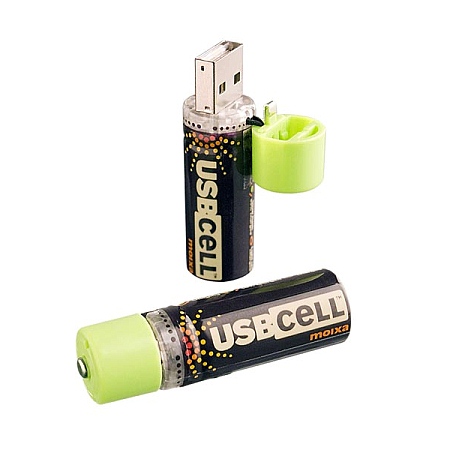
The Rechargeable USB AA Cell


A pack of these two Rechargeable USB AA cells cost around $19.95.

Nordic Semiconductor nRF24LU1+ USB dongle single chip system

Nordic Semiconductor has released the nRF24LU1+ USB dongle single chip for ultra-low power (ULP) wireless peripherals.

The nRF24LU1+ combines Nordic’s nRF24L01+ 2.4GHz radio transceiver with the nRF24LU1 USB dongle single chip device.

This solution includes an integrated voltage regulator that allows the chip to be powered directly from a USB bus, removing the requirement for an external voltage regulator. 

In addition, on-chip flash memory eliminates the need for an external E2PROM memory. The only external components the nRF24LU1+ chip requires are a low cost 16MHz crystal, decoupling, matching network and antenna.

More details can be found here.

Dec 9, 2008

Super Speed USB Logo and Cable Details - USB 3.0

 USB 3.0 uses different cable. But the connectors remains same. USB 3.0 cable carries 6 signals. The SuperSpeed USB carries 4 different signals, and can provide upto 50 percent more power for unconfigured or suspended devices, and 80 percent more power for configured devices.

USB 3.0 will support data rates as high as 5.0 Gb/sec— which is 10 times faster than USB 2.0 (High Speed USB). 

USB over IP Capabilities for your USB device. Silex introduced SDKs for network sharing of USB devices. It is called Silex Virtual Link SDKs.

For more information and features of this SDK visit here.


A USB Beverage Chiller?


Hmm.. that's an interesting Idea. 

This product is available here for 24.99 USD. But the web site also says it is out of stock.

Looks useful. Is in't it?

At Amazon also it is available. Here is the link.